home / 02 — projects / splunk add-on for cisco fmc
Splunk Add-on for Cisco FMC
Pulls firewall health, inventory and audit data from Cisco FMC into a ready-made Splunk dashboard.
- status
- shipped
- when
- may – jun 2026
- took
- ~3 weeks
- team
- solo project · cisco internship
about
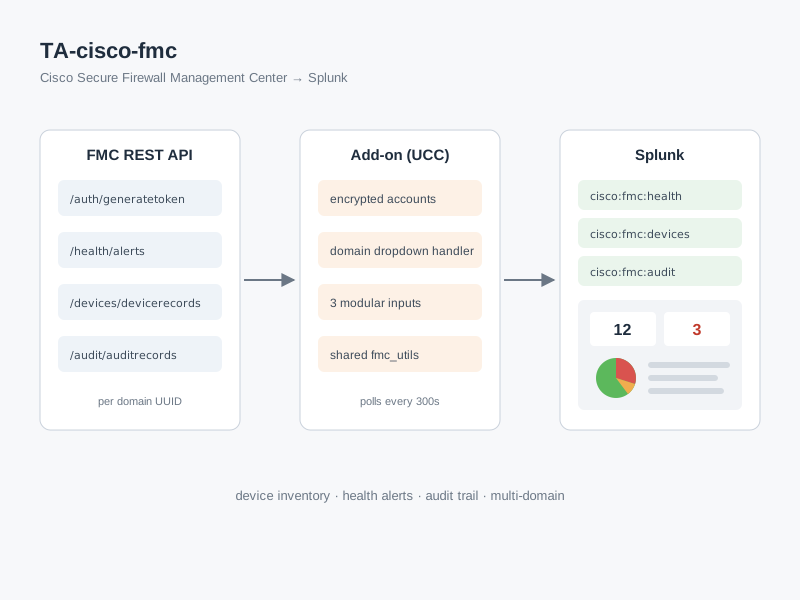
Cisco Secure Firewall Management Center (FMC) manages a fleet of firewalls, but its data sits behind a REST API rather than in the tools operations teams already watch. During my Systems Engineer internship at Cisco, I built a Splunk Technology Add-on that brings it into Splunk.
After installing, an admin adds an FMC account (the password is stored encrypted by Splunk) and creates inputs for three data sources: device inventory, health alerts and the audit trail. Each input polls the FMC API on a schedule and writes events under its own sourcetype. Since FMC can be split into several domains, the input form has a domain dropdown filled live from the FMC instance, so different domains can be monitored side by side.
It ships with a dashboard: number of managed devices, components with issues (turns red when above zero), a health-status breakdown, a table of active issues, per-device module health sorted by severity, and which API endpoints are being called. It's packaged as an installable .tar.gz and documented end to end. I also wrote about what building it taught me, on the writing page.
stack
- framework
- Splunk UCC framework (globalConfig.json generates the config UI, inputs and packaging)
- inputs
- Three Python modular inputs using splunklib and solnlib, sharing auth and HTTP helpers
- api
- FMC REST API via httpx, token auth through /auth/generatetoken, scoped per domain UUID
- ui
- Custom REST handler for the dynamic domain dropdown; Simple XML dashboard with SPL searches
what I learned
- Start from the framework's shape. Splunk's UCC framework generates the config pages, input forms and packaging from one globalConfig.json. Learning to work with it, instead of hand-writing Splunk config files, is what made a three-week timeline possible.
- Pull shared logic out early. All three inputs need the same steps: read the encrypted account, get a token and make an authenticated GET. Moving these into fmc_utils.py kept each input to a short, readable loop.
- Use what the API already gives you. FMC lists every domain a user can access in a response header when you request a token. The custom REST handler reads that header to fill the domain dropdown, so no extra endpoint or manual UUID entry is needed.
- Design dashboards around what an admin should act on. The panels go from a quick summary (counts, a status breakdown) to things to act on (non-green alerts only, modules sorted RED first), instead of dumping every event.
what was hard
- Learning a new platform without a clear spec. I started with no Splunk add-on experience and had to work out modular inputs, credential storage and custom REST handlers mostly from docs and trial and error.
- Splunk's Python environment. Splunk Enterprise 9.x runs Python 3.9, so dependencies had to be pinned to versions that still support it even though I developed on 3.11.
- Self-signed certificates and short-lived tokens. FMC instances usually use self-signed certificates and tokens expire after about 30 minutes, so each input run gets a fresh token instead of trying to cache and refresh one.
- Knowing where to stop. Pagination and a configurable dashboard index were left out on purpose, since a single call covers typical FMC sizes. Both are documented as known limitations.