home / 02 — projects / topology visualiser
Topology Visualiser
Point it at one switch and get back a draw.io map of the whole physical network.
- status
- shipped
- when
- jun – sep 2026
- took
- 3 months (alongside other work)
- team
- solo project · cisco internship
about
Network diagrams are usually drawn by hand and go out of date fast. During my Systems Engineer internship at Cisco, I built a tool that maps the physical topology for you: give it the management IP of any one device and it works out the rest.
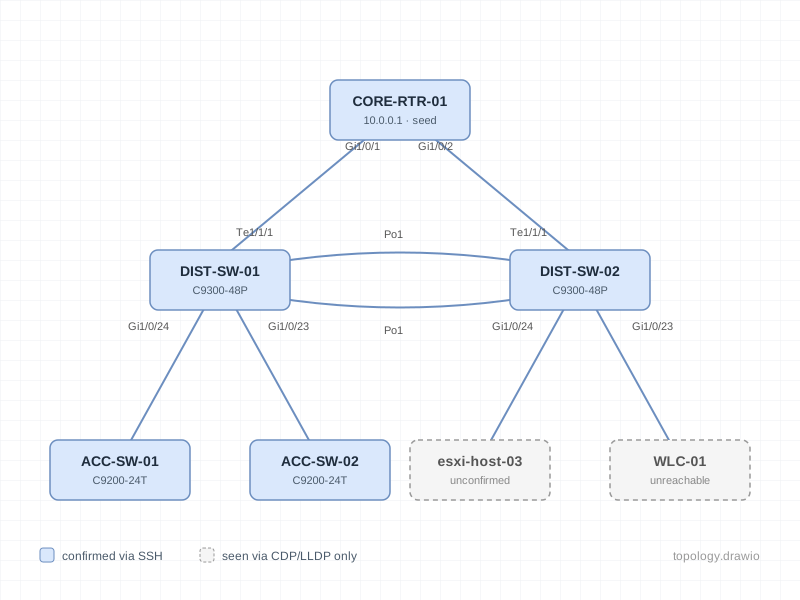
It SSHes into the seed device, runs show version, show cdp neighbors detail and show lldp neighbors detail, and adds every neighbour it finds to a breadth-first queue. It repeats this across the network until there's nothing new to visit. The result is exported as a draw.io diagram: each link is labelled with the interface on both ends, hovering over a device shows its IP, model, IOS version and serial, and devices that couldn't be logged into are shown in grey as unconfirmed instead of breaking the run.
I built and tested it against a real lab network, took it through coworker review, and kept a running log of design tradeoffs and accepted limitations before declaring an MVP feature freeze.
stack
- connectivity
- Netmiko over SSH, one shared credential set per run with an enable secret
- parsing
- ntc-templates / TextFSM for show version, CDP and LLDP neighbour output
- graph
- NetworkX MultiGraph, so redundant links between the same two devices stay separate
- output
- draw.io XML generated with ElementTree, plus a quick matplotlib preview
what I learned
- Device identity is the hard part, not the traversal. The same switch can be reported by several neighbours under different IPs. I gave every device a temporary record when first seen, then merged records using a union-find structure once logging in revealed a matching serial number. This meant identity was checked in order: serial first, then IP.
- Treat partial failure as normal. On a real network some devices are unreachable or reject the credentials. Timeouts and auth failures are caught per device, so the tool skips them, marks them as unconfirmed and keeps going instead of crashing halfway through a large network.
- Don't rebuild what the output tool already does well. NetworkX's spring layout doesn't know how big the boxes are, so nodes overlapped on dense networks. Instead of writing my own layout algorithm, I decided to rely on draw.io's built-in Vertical Flow layout, which handles box sizes, and documented it as a one-click step.
- Write down the tradeoffs. I kept a running dev-notes file of gaps, decisions and deferred work with dates. It made review conversations faster and made the scope of the MVP clear.
what was hard
- Devices with no identity. Hosts like ESXi servers show up in CDP/LLDP with no management IP, and since the tool never logs into them there's no serial either. The same host seen from two switches became two nodes. Using LLDP's chassis ID (often a MAC address) would fix some cases, but devices that only speak CDP have no identifying signal at all, so I deferred it past MVP.
- Parallel links. Redundant cables between the same two devices had to be stored as separate edges, which is why the graph is a MultiGraph. The matplotlib preview still draws them on top of each other, so the draw.io export is the main output.
- Making the diagram readable. Raw interface names like TenGigabitEthernet1/1/1 cluttered every link, so labels are shortened to standard abbreviations (Te1/1/1), and confirmed and unconfirmed devices are colour-coded after feedback from review.
what's next
- Use LLDP chassis ID as a third identity check (serial → IP → MAC) to cut down duplicate endpoint nodes
- Detect EtherChannel bundles so member links are grouped as one logical connection
- Retry other known IPs, and support more than one credential set, when a device fails to connect